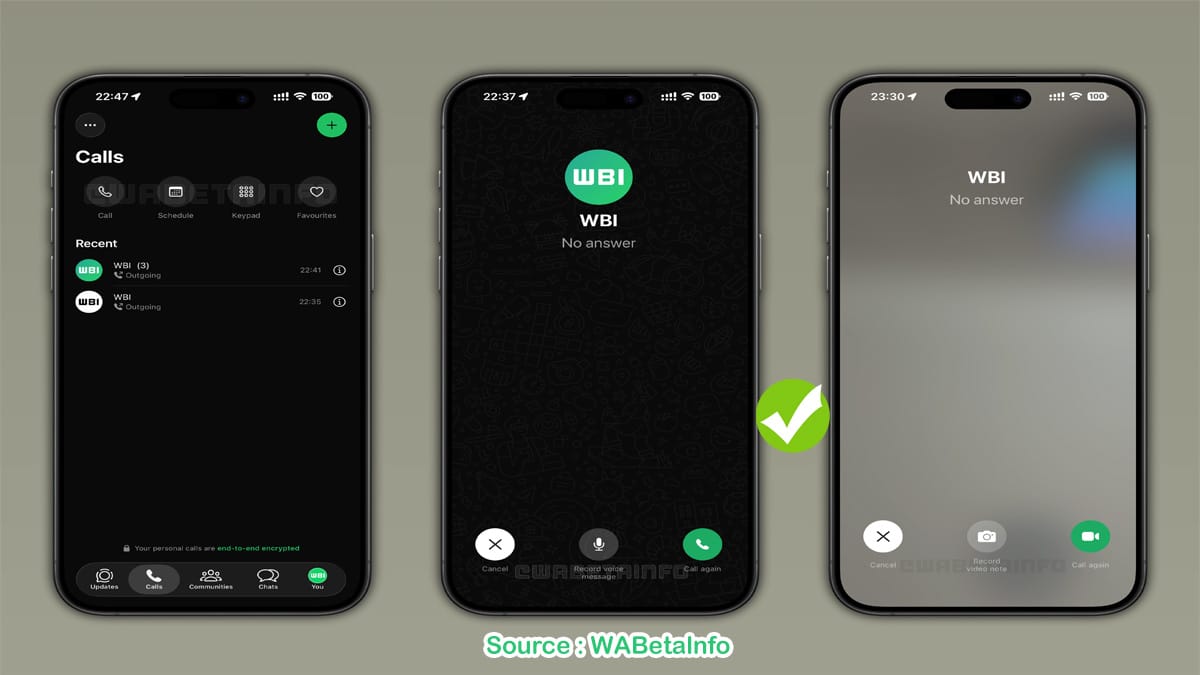
WhatsApp Missed Call Voice and Video Messages: How to Use the New Feature is the latest update from WhatsApp that allows users to leave a voice or video message when calls go unanswered. This powerful feature ensures your messages reach the recipient even if the call is missed., WhatsApp has become an indispensable app for millions of users in India and across the globe. From instant messaging to group calls, it continues to innovate in ways that make our daily communication smoother.
The latest update introduces WhatsApp missed call voice and video messages, a feature that allows you to leave a personal note when someone doesn’t pick up your call, Imagine you’re running late for a meeting, and your colleague misses your call. Instead of typing a long message, you can now quickly record a voice or video note directly from the call screen. This small but powerful addition is set to transform how we handle missed calls.
Understanding WhatsApp Missed Call Voice and Video Messages: How to Use the New Feature
WhatsApp missed call voice and video messages let users send short audio or video notes when a voice or video call goes unanswered. Previously, missed calls only showed a notification, leaving the recipient unaware of the urgency or reason behind the call. With this update:
- Voice Messages: Record a brief audio note directly from the missed call screen.
- Video Messages: Leave a short video message if a video call is missed, making communication more personal.
- Automatic Delivery: These messages are sent along with the missed call alert, ensuring your recipient gets it instantly.
This feature is perfect for sharing urgent updates, instructions, or just a friendly reminder without typing lengthy texts.
How to Leave a Voice or Video Message on WhatsApp
Leaving a missed call message is straightforward. Here’s a step-by-step guide:
- Open the Calls tab on WhatsApp.
- Locate the missed call you want to respond to.
- Tap “Record Voice Message” for voice or “Record Video Message” for video.
- Record your message and release to send.
It’s that simple that, The new interface ensures users can quickly communicate without navigating multiple menus.
Redesigned Calls Tab
WhatsApp has also redesigned the Calls tab to make call management easier than ever. Key highlights include:
- Unified Call Hub: All call-related actions are now organized in a single location.
- One-on-One or Group Calls: Start calls with up to 31 participants directly from this tab.
- Favourites and Groups: Easily access contacts, create groups, or manage favourites without extra steps.
- Faster Navigation: A cleaner layout reduces clutter and speeds up daily calling tasks.
This update not only improves missed call handling but also enhances the overall calling experience.
Schedule Calls in Advance
Another useful addition is the call scheduling feature. Users can now:
- Schedule voice or video calls in advance.
- Share the scheduled call event inside a chat.
- Notify all participants automatically.
This is especially helpful for:
- Team meetings
- Family catch-ups
- Coordinated group discussions
Scheduling calls reduces the chance of missing important conversations and ensures everyone stays on the same page.
Benefits of WhatsApp Missed Call Voice and Video Messages
- Personalized Communication: Send voice or video notes to explain why you called.
- Time-Saving: No need to type long messages.
- Better Group Coordination: Especially for work meetings or family planning.
- Faster Response: Recipients understand the urgency without checking texts.
- Enhanced User Experience: The unified calls tab makes navigation seamless.
Availability and Rollout
Currently, this update is rolling out widely to iPhone users through the App Store. Meta is monitoring the feature’s performance before expanding it globally. Android users can expect the update in the coming weeks, For the latest updates, you can check WABetaInfo, a reliable source for WhatsApp news.
Tips to Make the Most of the Feature
- Keep your messages short and concise for better impact.
- Use video messages for instructions or explanations that are easier to show than tell.
- Combine call scheduling with reminders for professional or group meetings.
- Regularly update WhatsApp to get the newest features first.
While WhatsApp continues to innovate with features like missed call voice and video messages, staying updated on technology and AI trends can also enhance your digital experience. For instance, in India, Gemini became the most searched AI in 2025, highlighting how AI tools are shaping communication and technology usage. You can read more about it here.
How to Recall a Sent Email in Gmail? 6 Easy Steps to Undo Send










1 thought on “WhatsApp Missed Call Voice and Video Messages: How to Use the New Feature in 2025”